
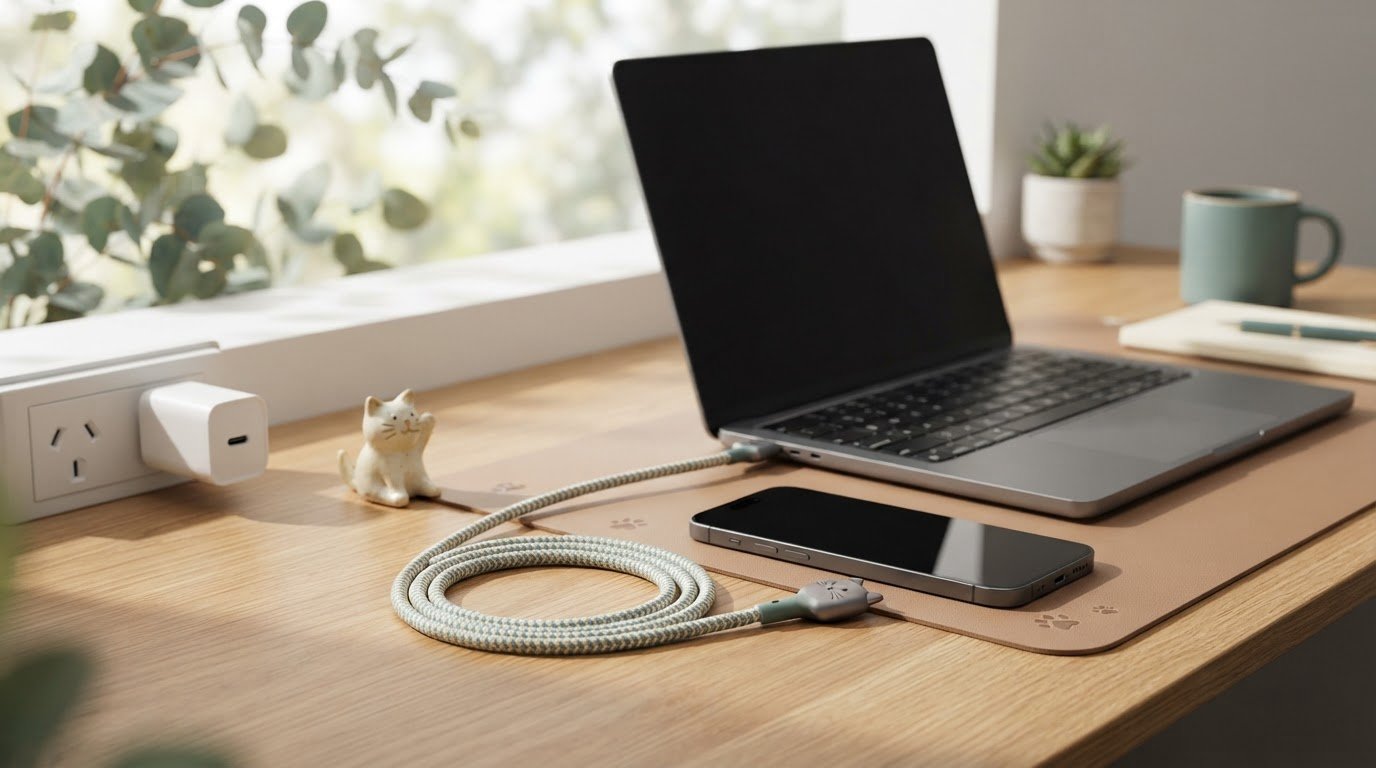
What if the cutest cable in your drawer isn’t the right one for a quick charge? A fast charging cable cat lovers can adore still needs to suit the device and adapter it’s paired with. The Maogeju USB-C 240W Super Fast Charging Cable has a playful look, but its 240W label describes the cable’s stated power rating, not a promise that every phone or laptop will charge at that rate.
USB-C compatibility can feel puzzling, especially when a rating sounds higher than your everyday setup needs. This guide walks through how to check your device, adapter and cable together, and explains what a 240W label can and can’t tell you. You’ll also find practical points to compare before choosing a cat-themed cable for your desk, bedside table or work bag. Cute and practical can curl up together. 🐾
Key Takeaways
- Check your device’s port and manufacturer charging guidance first, then confirm the adapter suits the setup.
- Charging speed depends on the device, adapter, cable and supported charging method working together.
- A 240W label describes the cable’s stated power rating, not the speed every device will reach. Check your device and adapter specifications before choosing.
- Compare cable options by connector fit, stated power information, adapter match and the cat design you’ll enjoy using.
- If you’re choosing a fast charging cable cat lovers will adore, explore the Maogeju USB-C 240W Super Fast Charging Cable and check its current product details against your setup.
Fast charging cable for cat lovers: what determines charging speed?
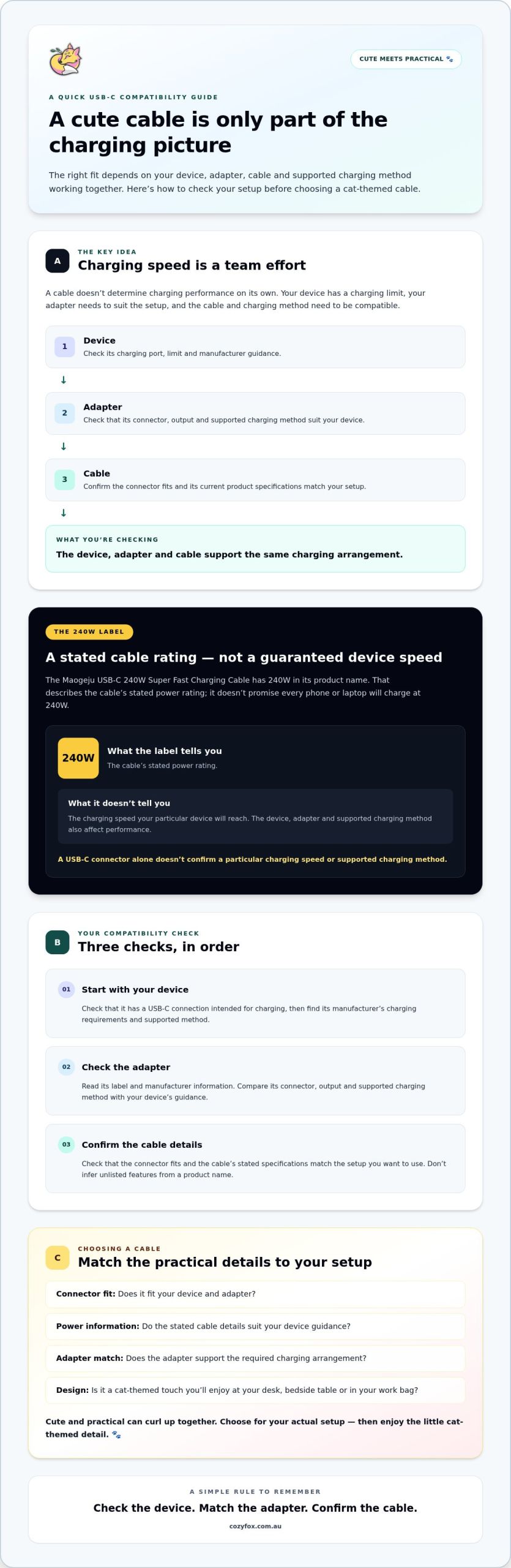
A cute cable won’t necessarily charge your device quickly. Charging performance depends on the device, adapter, cable and charging method they support. If one part doesn’t match the others, the setup may not deliver the performance you expect.
Your device has a limit on how much power it can accept. The adapter needs to supply power in a compatible way, and the cable needs to support the connection. So, when choosing a fast charging cable cat lovers will enjoy, check that it fits your whole setup, not just your desk aesthetic. The USB-C connector can support different power capabilities, but the connector type alone doesn’t tell you the charging speed you’ll get.
What does fast charging mean for your device?
“Fast charging” means charging at a rate supported by the device and its other charging components. Phones, tablets and laptops can have different charging limits, even when they use a USB-C port. Check the manufacturer’s guidance for your specific device to find its charging requirements. Don’t assume that a cable or adapter’s highest stated capacity is the rate your device will accept.
Before choosing a cable, look up your device’s recommended charging method and power information. Compare those details with the adapter and cable specifications. This check helps you choose a setup based on your actual device, rather than guessing from the connector shape or a headline rating.
What does 240W mean on a USB-C cable?
A 240W label describes a stated power rating. It doesn’t promise that every connected device will charge at 240W. The device and adapter also affect charging performance, and the supported charging method needs to match. A phone with a lower charging limit won’t draw the cable’s full stated capacity just because the cable name includes 240W.
A cable’s power rating tells you what it’s stated to support; your device’s charging limit helps determine the speed you’ll actually get.
The Maogeju USB-C 240W Super Fast Charging Cable has 240W in its product name. Before choosing it, check the current product details for its stated capabilities, then compare them with your device maker’s charging guidance and your adapter’s specifications. Don’t infer unlisted features or a particular charging result from the name alone.
Use this quick compatibility check:
- Find your device’s charging guidance.
- Check what power and charging method your adapter supports.
- Confirm the cable’s current product specifications match the setup you want to use.
Once those details line up, you can choose a cable for its practical fit as well as its cheerful cat-themed touch. 🐾
How to check whether a fast-charging cable suits your device
A few checks can help you avoid choosing a cable based on looks or a headline rating alone. Work through your setup in this order: identify the device’s charging port, find its charging guidance, then check the adapter and cable details. That way, you can decide whether a fast charging cable cat lovers will adore also fits the tech you use every day.
Start with the device and its USB-C port
First, check that your device has a USB-C connection intended for charging and that the cable’s connector fits. Then look up the device maker’s manual or support information for its charging requirements. A USB-C-shaped port identifies the connector, but it doesn’t confirm a particular charging speed or supported charging method. Use the manufacturer’s guidance as your reference point.
Note any stated charging requirements, including the supported method or power information. If you’re unsure how USB Power Delivery works, the USB Implementers Forum’s USB Power Delivery (PD) specification provides an official reference. You can also read this cute USB-C charging cable guide for broader cable context.
Check the adapter as part of the charging solution
Your cable doesn’t work alone. The adapter needs a connector that fits the cable and an output that suits your device’s requirements. Check the adapter label, then refer to its manufacturer information to confirm its supported charging method and power details. Compare those with the device guidance and the cable’s stated specifications. If a protocol or wattage detail isn’t clear, check the product documentation instead of guessing.
The device, adapter and cable all need to support the same charging arrangement for the setup to work as intended. A mismatch may mean you don’t get the charging performance you expect, even if one component has a high power rating. Focus on a compatible charging solution, not simply the biggest number on a label.
Before you choose, check:
- Does your device have a USB-C charging connection that fits the cable?
- What charging method and power requirements does the device maker state?
- Does the adapter match the device and cable requirements?
- Do the cable’s current product details confirm the connector and capabilities you need?
When those details line up, you can add feline personality to your charging routine with more confidence. If you’re considering the Maogeju USB-C 240W Super Fast Charging Cable, compare its current product information with your device and adapter before choosing. 🐾
Cute design or charging performance: how to compare cable options
A cable can bring feline flair to your desk, but its appearance can’t tell you whether it suits your devices. Compare the practical details first, then choose a design you’ll enjoy using. For a fast charging cable cat lovers can feel good about picking, separate what the product information confirms from what you need to check against your setup.
Which cable details should you compare?
Use this comparison guide when looking at cable options. Check the cable’s current product details for its stated information, and your device and adapter documentation for the rest.
| Check | What to compare | What to verify |
|---|---|---|
| Connector fit | The cable connector and the charging ports on your device and adapter. | Confirm the connectors fit the parts you plan to connect. |
| Stated cable rating | Any power information shown in the product name or listing. | Check the full product specifications. Don’t assume a name tells you every supported feature. |
| Device match | Your device maker’s charging guidance. | Confirm the device supports the charging method you intend to use. |
| Adapter match | The adapter’s label and manufacturer information. | Compare its connector and stated output with the device and cable requirements. |
The Maogeju USB-C 240W Super Fast Charging Cable is part of Cozy Fox Lifestyle’s cat-themed range. Its name includes a 240W rating, but check the current Cozy Fox Lifestyle product information for detailed specifications rather than assuming unlisted capabilities. Don’t infer durability, data-transfer performance or other features unless the product documentation states them.
Remember: check the connector, device, adapter and stated cable rating before you choose. This keeps the decision grounded in fit and verified information, while leaving room for personal style.
How can a cat-themed cable fit your everyday setup?
Think about where you’ll use it: beside your bed, on your desk or tucked into your work bag. A cat-themed design can add a playful detail to those everyday spots. Treat the feline look as a style choice, not a sign of charging performance. Compatibility still depends on the product details and your device-and-adapter setup.
For more ideas to brighten a workspace, explore cute alternatives to boring tech. A little cat charm can make practical tech feel more like yours. 🐾
How to choose and use a fast-charging cable with confidence
A little checking before you buy or plug in can make your charging setup less of a guessing game. Use the device and adapter makers’ information as your guide, then compare it with the cable’s stated product details. That way, your choice of fast charging cable cat lovers can enjoy is based on fit as well as feline charm.
A quick pre-purchase compatibility checklist
Before choosing a cable, work through these checks:
- Device: Confirm the charging connector and check the manufacturer’s guidance for charging requirements and supported methods.
- Adapter: Check that its connector fits and review its label and manufacturer information for output and compatibility details.
- Cable: Compare those details with the cable’s stated product specifications. If a key detail isn’t listed or you’re unsure how it matches, check with the relevant manufacturer before choosing.
Then consider the complete charging solution: the device, adapter and cable together. Don’t rely on a connector shape or power rating by itself to confirm compatibility. A higher-rated cable can be part of a suitable setup, but it won’t change what the device and adapter support.
What to check when charging feels slower than expected
Start by reviewing the information for all three parts. Check the device’s charging requirements, the adapter’s output and supported method, and the cable’s stated specifications. If your device or adapter has a lower limit than another component, charging behaviour may reflect that limit. The cable’s rating alone can’t establish the speed you should expect.
Keep the check simple rather than assuming the cable is at fault or trying to diagnose a device issue. If the product details or manufacturer guidance don’t clarify whether your setup is compatible, ask the relevant manufacturer for help. That keeps your next step grounded in information about your actual device and adapter, not guesswork.
With the practical checks sorted, you can choose a design that feels at home on your bedside table, desk or in your work bag. For a playful cat-themed option, explore the Maogeju USB-C 240W Super Fast Charging Cable, and compare its current product information with your setup before selecting it. 🐾
Meet the Maogeju USB-C 240W Super Fast Charging Cable
An everyday accessory can be practical and have a little personality, too. The Maogeju USB-C 240W Super Fast Charging Cable is part of Cozy Fox Lifestyle’s cat-themed range, bringing a feline touch to an item you might keep by your desk or bedside table. Its name includes a 240W rating, but that number alone doesn’t tell you how it will perform with your particular device and adapter.
Who might enjoy this cat-themed USB-C cable?
If you like adding cat-inspired details to everyday tech, this cable may catch your eye. Picture it as part of your work-from-home setup or packed with your usual charging essentials. The appeal is choosing an accessory that feels more personal than a plain utility item.
Before deciding, check the current product information for the cable’s stated specifications. Compare those details with your device’s charging guidance and your adapter’s output and compatibility information. The product name identifies it as USB-C and includes 240W, but don’t assume it confirms other features or guarantees a particular charging result. Your device and adapter requirements still matter.
Where to go next with your cable search
For related design inspiration, have a look at this cat-shaped cable connector guide. As you explore playful cable ideas, keep your choice grounded in four checks: your device’s requirements, the adapter’s details, connector fit and the cable’s verified specifications. This gives the look you love and your practical needs equal attention.
If you’re considering a fast charging cable cat lovers can enjoy in their everyday setup, review the Maogeju USB-C 240W Super Fast Charging Cable’s product information on Cozy Fox. Compare its listed details with your own charging setup before choosing. No guesswork, just a little cat charm paired with a considered choice. 🐾
Choose a cable that feels right for your setup
Cat-inspired charm can make an everyday tech accessory feel more personal. For a fast charging cable cat lovers will enjoy, let the design catch your eye, then base your choice on the details that matter for your devices.
Before choosing, confirm the cable’s current product information and check that it suits your device and adapter. Remember, the 240W in a cable’s name is a rating, not a promise that every connected device will charge at that rate. Your complete charging solution needs to be compatible.
The Maogeju USB-C 240W Super Fast Charging Cable is a cat-themed item in the Cozy Fox Lifestyle range. If its look would make a happy addition to your desk or bedside table, take a closer look at the listed product details and compare them with your setup.
Explore the Maogeju USB-C 240W Super Fast Charging Cable, and choose with confidence. A thoughtful compatibility check and a touch of feline personality can make your everyday charging routine feel a little more you. 🐾
Frequently Asked Questions
Is a 240W USB-C cable guaranteed to charge my device at 240W?
No. A cable’s 240W label doesn’t mean every connected device will draw that much power. The device, compatible charging adapter and supported charging method all affect the result. Check the manufacturer’s information for each part of your setup, and review the cable’s current product specifications before relying on a particular rating. Your device may support a lower charging limit, even when the cable is rated for more.
Can any USB-C cable fast-charge a phone or laptop?
Not necessarily. USB-C describes the connector, but it doesn’t confirm a cable’s power capabilities or the charging methods supported by your device and adapter. Check the charging guidance for your phone or laptop, then compare it with the adapter and cable information. A USB-C plug alone isn’t enough to establish fast-charging compatibility. Look for verified specifications before choosing a cable for a particular setup.
How do I know whether a fast-charging cable is compatible with my device?
Start by checking your device’s charging connector and requirements in its manual or the manufacturer’s support information. Then review your adapter’s connector, output and compatibility guidance, and compare those details with the cable’s verified specifications. A fast charging cable cat lovers enjoy should still suit the device and adapter it will connect to. If a technical detail is unclear, ask the manufacturer or seller rather than guessing.
What happens if my adapter has a lower rating than my cable?
The cable’s stated rating won’t make the adapter or device charge at that level. Charging depends on the supported limits of the full setup, including the device, adapter, cable and charging method. Check the device and adapter documentation to understand their requirements. If the components don’t match your intended use, choose equipment based on manufacturer guidance rather than expecting the cable alone to increase charging speed.
Can I use the Maogeju USB-C 240W Super Fast Charging Cable with any USB-C device?
Don’t assume universal compatibility from the connector or product name alone. Check the current Cozy Fox product information alongside your device’s charging requirements and adapter details. The product is listed as a USB-C cable, but its specific compatibility and charging performance should be confirmed against its current specifications. If you can’t find the information you need, contact the retailer before choosing.
Does a fast-charging cable also affect data transfer?
Charging and data transfer are separate capabilities to check. A cable’s name or power rating doesn’t, by itself, confirm a particular data-transfer capability. If you plan to transfer files or connect accessories, look for data information in the cable’s product specifications and compare it with your device requirements. Don’t assume a cable supports every task you have in mind unless the relevant details are stated and confirmed.



1 Comment